How to Choose Review Software for Your Small Business



To choose the best review software for a small business, first define your specific needs, such as which review sites you want to monitor and how you'll request reviews. Then, evaluate key features like automated review requests, a centralized dashboard, and response templates, ensuring the software fits your budget and integrates with your existing tools.
What Is Review Management Software?
Review management software is a tool that helps businesses monitor, collect, and respond to customer reviews from a single platform. It centralizes feedback from multiple sites like Google, Yelp, Facebook, and industry-specific portals into one dashboard. This eliminates the need to log in to each site individually, saving significant time and effort.
By streamlining these processes, the software helps you improve your online reputation, gather valuable customer insights, and engage with your audience more efficiently. Ultimately, it turns customer feedback from a chore into a powerful asset for business growth.
How Do I Determine My Business's Needs?
You determine your business's needs by performing a self-audit of your goals, key platforms, internal resources, and current review volume. Understanding these four areas will give you a clear framework for evaluating which software features are essential and which are simply nice to have. This clarity prevents you from overpaying for a tool with features you'll never use.
A quick assessment will help you build a shortlist of vendors that align with your specific situation. Use these questions to guide your thinking:
- Goals: What is your primary objective? Are you trying to generate more reviews to build social proof, or is your main challenge managing and responding to negative feedback? Perhaps you want to leverage positive reviews in your marketing materials. Define your top one or two goals first.
- Key Platforms: Where do your customers already leave feedback? Check your Google Business Profile, Facebook page, Yelp, and any industry-specific sites like TripAdvisor or Avvo. Your software must support the platforms that matter most to your audience.
- Team & Resources: Who will be responsible for using the software? Is it a single business owner or a small marketing team? Consider how much time they can realistically dedicate each week to managing reviews.
- Volume: How many new reviews does your business receive each month? A business getting 10 reviews a month has different needs than one getting 100. This number will directly impact which pricing model and feature set make the most sense.
What Are the Must-Have Features in Review Software?
The must-have features in review software are those that automate review collection, centralize all monitoring activities, and simplify the response process. These core functions are the foundation of any effective review management strategy, directly addressing the biggest time-sinks and challenges for small businesses.
Beyond the basics, look for robust analytics to measure your progress and prove your return on investment. Here are the essential features broken down.
Review Generation & Collection
The single most effective way to improve your online reputation is to get more authentic reviews. The best software makes this easy by automating review requests via email and SMS. Look for platforms that allow you to create customizable templates so your outreach aligns with your brand voice.
Crucially, the software should support sending triggers. For example, an integration with your point-of-sale system can automatically send a review request a day after a customer makes a purchase. This "ask" at the peak of customer satisfaction dramatically increases the likelihood of receiving positive feedback, as detailed in our guide to getting more online reviews.
Centralized Monitoring & Alerts
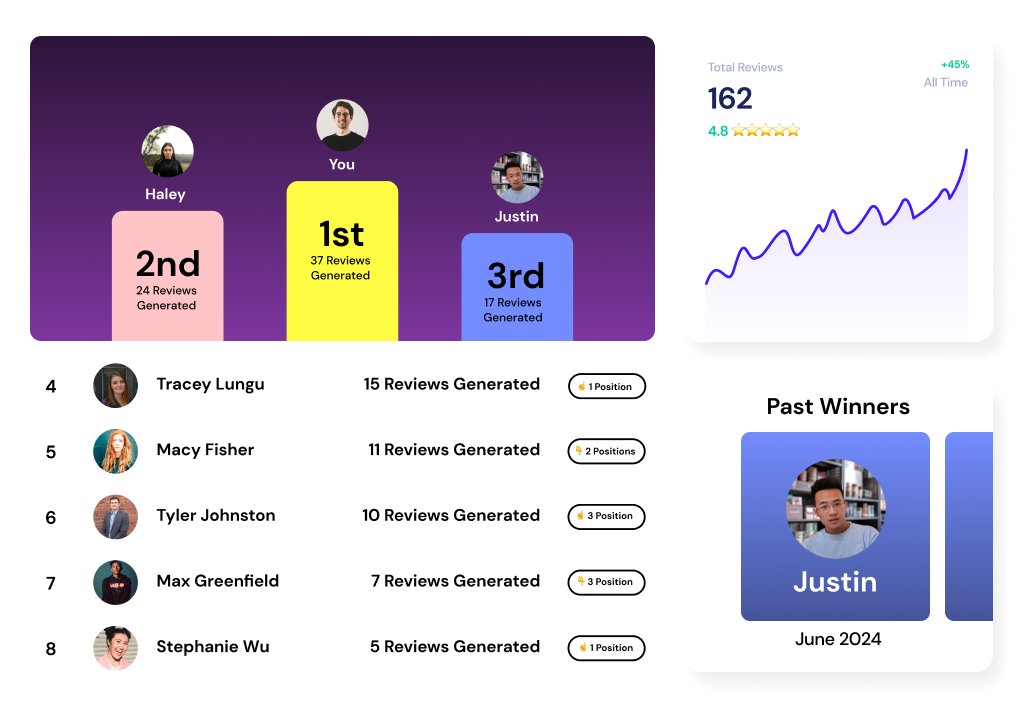
A centralized dashboard is the heart of any review management tool. It pulls in reviews from every platform you care about—Google, Facebook, Trustpilot, etc.—into a single, easy-to-scan feed. This gives you a complete, real-time overview of your online reputation without having to jump between a dozen different websites.
This feature should be paired with real-time alerts. You can set up notifications to be sent via email or to a team communication tool like Slack whenever a new review is posted. This is especially critical for negative reviews, as a rapid response can often de-escalate a situation and show other potential customers that you care.
Response Management Tools
Responding to every review, both positive and negative, is a best practice. To make this manageable, good software provides response management tools. These often include a library of saved response templates that you can quickly customize for common scenarios, saving you from typing the same message repeatedly.
More advanced platforms now include AI-assisted responses, which can draft a relevant, on-brand reply that you can edit and approve in seconds. These tools ensure no review goes unanswered and help you effectively manage online reviews for your small business with minimal time investment.
Reporting & Analytics
You can't improve what you don't measure. Strong reporting and analytics features allow you to track key performance indicators (KPIs) and demonstrate the value of your efforts. Your software's dashboard should clearly display metrics like your overall star rating, review volume over time, and response rates.
Look for a platform that offers sentiment analysis, which is the use of artificial intelligence to determine if the emotion in a text is positive, negative, or neutral. This helps you quickly gauge overall customer satisfaction at a glance and identify trends in feedback without having to read every single review. Understanding these metrics is key to calculating the ROI of reviews for your business.
How Much Does Review Software for Small Businesses Cost?
Review software for small businesses typically costs between $50 to $300 per month per location. The final price depends on the number of locations you have, the feature set you require, and the number of review requests you send each month. Most providers offer several pricing models to fit different business needs.
Understanding these models is key to finding a plan that offers value without breaking your budget. Here are the three most common structures you'll encounter:
| Pricing Model | Description | Best For |
|---|---|---|
| Per Location / Per User | A flat monthly or annual fee is charged for each physical business location or team member account. | Businesses with one or a few locations; small teams. |
| Tiered (Feature-Based) | Plans are offered in tiers (e.g., Basic, Pro, Enterprise) with more features at higher price points. | Businesses that want to start small and scale up later. |
| Usage-Based | Pricing is based on a specific metric, like the number of review requests sent per month. | Businesses with fluctuating or low review volume. |
Key Integrations to Consider
Integrations are connections that allow your review software to share data with other tools you use, automating workflows and saving you from manual data entry. The right integrations act as a force multiplier, embedding review collection directly into your existing customer journey. For a small business, a few key integrations can make all the difference.
- Point of Sale (POS) / CRM: This is the most critical integration. By connecting your review software to your POS (like Square, Toast) or Customer Relationship Management (CRM) platform (like HubSpot, Salesforce), you can automatically trigger review requests after a transaction or service is completed. This ensures the request is sent at the perfect time.
- Communication Tools: Receiving notifications where your team already works keeps everyone in the loop. Integrations with platforms like Slack or Microsoft Teams can push new review alerts directly to a dedicated channel, allowing for rapid, collaborative responses.
- Marketing Software: Syncing your review platform with your email marketing tool (like Mailchimp) or social media scheduler allows you to seamlessly use your best reviews as social proof. Some tools can automatically create social media graphics from 5-star reviews or feed them into email marketing campaigns.
Making Your Final Choice: A 5-Step Checklist
Choosing the right software can feel overwhelming, but a structured approach simplifies the process. Once you've defined your needs and identified key features, follow this checklist to confidently make your final decision and select a partner for your business's growth.
- Shortlist 3-5 Vendors: Based on your initial research, identify a handful of providers that seem to meet your core needs and budget.
- Request Demos: Schedule a live demonstration with your top contenders. This is your chance to see the software in action and ask specific questions related to your business challenges.
- Run a Free Trial: Never buy software without testing it first. Sign up for a free trial and use it for a week or two. Pay close attention to how intuitive the user interface is and whether it truly simplifies your workflow.
- Check User Reviews: See what other small business owners are saying. Look up your shortlisted vendors on independent software review sites like G2 and Capterra to get unbiased feedback on their strengths and weaknesses.
- Confirm Support Options: Problems will eventually arise. Before you commit, confirm what kind of customer support is offered. Look for providers that offer multiple channels like live chat, email, and phone support, and check their stated response times.
Frequently Asked Questions
Can I manage business reviews for free? You can manually manage reviews for free by logging into each platform (like Google Business Profile) individually. However, free methods lack the automation, centralization, and reporting that paid review software provides, which saves significant time and provides deeper insights.
How long does it take to set up review software? Basic setup for most review software takes less than an hour. This usually involves connecting your review site profiles (e.g., Google, Facebook), uploading your logo and brand colors, and customizing your first automated review request campaign.
Should I focus only on Google reviews? While Google reviews are critical for local SEO, you should also monitor industry-specific sites where your customers make decisions (e.g., TripAdvisor for hospitality, Avvo for lawyers). Good software monitors reviews across all relevant platforms, not just Google.
What's the difference between review management and reputation management software? Review management software focuses specifically on generating, monitoring, and responding to customer reviews on sites like Google and Yelp. Reputation management software is a broader category that often includes review management plus other services like social media monitoring, business listing accuracy, and tracking press mentions.
How can I get more positive reviews using software? Software boosts positive reviews by automating the "ask" at the perfect time, like right after a successful purchase or service. By sending a direct link and making the process effortless for happy customers, you dramatically increase the volume and quality of positive feedback you receive.
Choosing the right review software is an investment in your business's reputation and long-term growth. By carefully assessing your needs and evaluating platforms based on core features, integrations, and support, you can find a tool that not only saves you time but also turns customer feedback into your most powerful marketing asset.


Join the large list of small businesses using Drumroll!