Easy Review Software for a Solo Business Owner


The easiest review software for a solo business owner automates the request process and consolidates all reviews into one simple dashboard. Tools designed with features like automated SMS and email triggers and pre-built templates allow a single person to manage their online reputation in minutes per day. This approach eliminates the need for a dedicated marketing team.
For a time-strapped entrepreneur, manually asking every customer for a review, then checking Google, Facebook, and Yelp every day is an impossible task. The right software handles the heavy lifting, letting you focus on running your business while your reputation grows automatically. It’s not about adding another complex tool, it’s about using a simple one to reclaim your time.
What Makes Review Software Easy to Use for a Solopreneur?
Software becomes easy for a solopreneur when it’s built around automation, a unified interface, and a minimal setup time. As a solo business owner, you don't have an IT department or hours to watch tutorials. "Easy" means you can be up and running in under an hour and confident that the system is working for you in the background.
The core principle is efficiency. Every feature should be designed to reduce manual work and save you from having to log in to multiple websites. It should make a complex process, online reputation management, feel like a simple, manageable part of your daily routine.
Set-It-and-Forget-It Automation
The most powerful feature of easy-to-use review software is automation. You can set up triggers, which are specific customer actions that automatically send a review request. This means you ask for a review at the perfect moment without lifting a finger.
For example, a trigger could be a finalized invoice in QuickBooks, a completed appointment in a scheduling app, or a fulfilled order in Shopify. The software detects this event and sends a pre-written text or email asking for feedback. This level of automation ensures no customer is missed and that your request arrives when their experience is top of mind. For a deeper look, explore a guide to using SMS software to ask customers for reviews.
A Single, Unified Dashboard
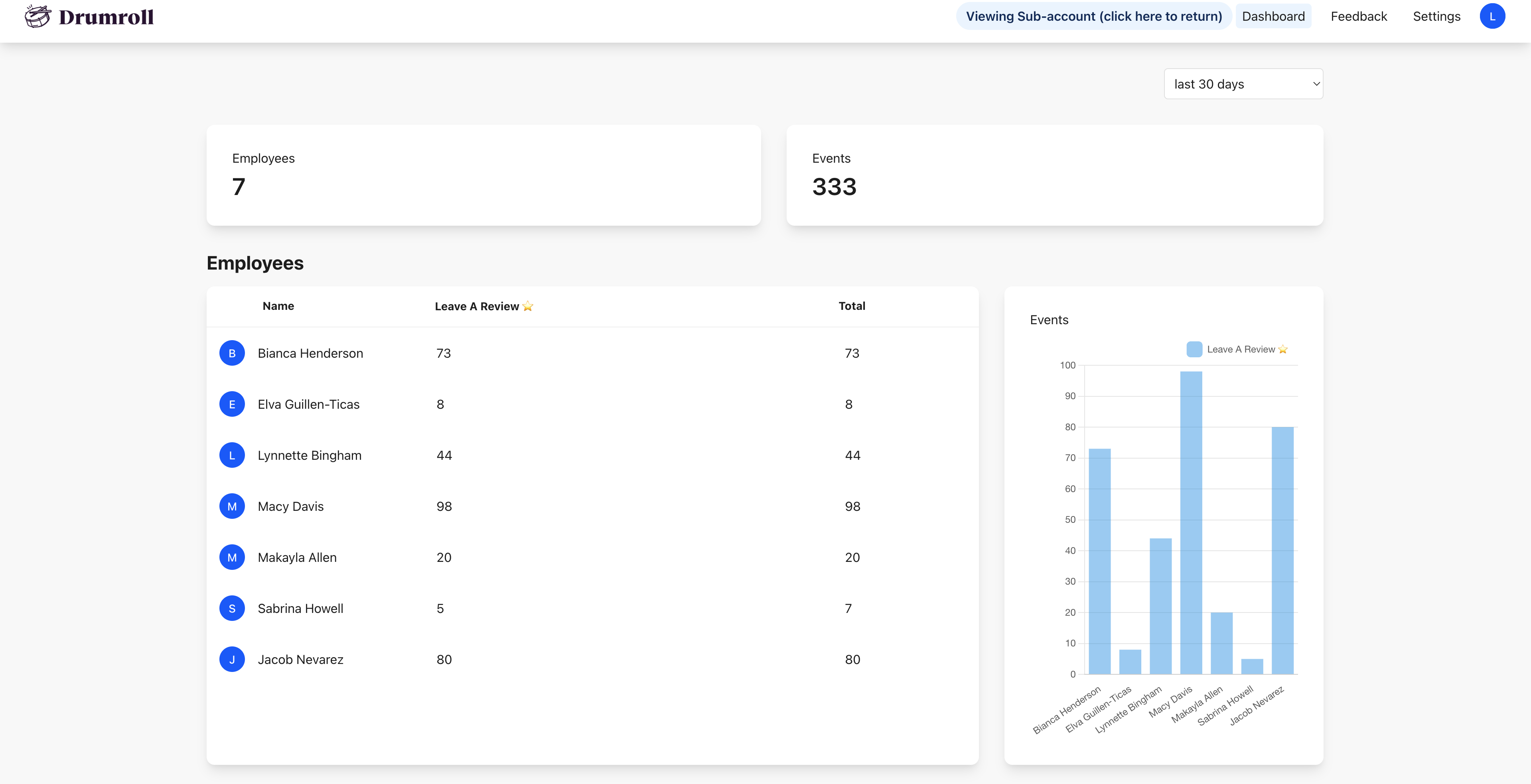
Easy software saves you time by bringing everything into one place. This is done through review aggregation, a feature that pulls all your reviews from different sites like Google, Yelp, Facebook, and industry-specific platforms into a single feed.
Instead of spending 20 minutes each morning checking every platform individually, you can log into one dashboard and see everything at a glance. You can read new reviews, track your overall star rating, and reply to customers directly from one screen. This centralization transforms reputation management from a scattered chore into a streamlined task.
A Minimal Learning Curve
You shouldn't need a marketing degree to use your review software. The best tools for solopreneurs have a clean user interface (UI) and a guided setup process that gets you operational quickly. The goal is to connect your accounts and launch your first campaign in minutes, not days.
Look for a platform with clear navigation, helpful tooltips, and a straightforward process for creating message templates. If a software's dashboard looks overwhelmingly complex, it probably is. The right tool feels intuitive from the moment you log in, empowering you to manage your reputation confidently without a steep learning curve.
What key features does a solo business owner actually need?
A solo business owner needs features focused on review generation, monitoring, and responding, without the complex analytics or team-based tools found in enterprise software. Your priority is a simple, effective system that automates requests and helps you engage with customers efficiently. Anything more is often a distraction.
Many platforms offer a dizzying array of features, but a solopreneur can thrive by focusing on a core set of essentials. Overly complicated tools can lead to decision fatigue and may include costly features you'll never use. For a more detailed breakdown, see our guide on how to choose review software for your small business.
To simplify the choice, here is a clear distinction between what is truly necessary and what is merely a bonus.
| Must-Have Features | Nice-to-Have (But Not Essential) Features |
|---|---|
| Automated SMS & Email Requests | Advanced A/B testing of messages |
| Centralized Review Dashboard | Competitor monitoring |
| Direct links to Google, Facebook, etc. | Social media sharing suites |
| Negative Review Alerts | Detailed sentiment analysis reports |
| Simple Response Templates | Custom branding on all widgets |
How much time can easy review software actually save?
Easy review software can save a solo business owner between 5 and 10 hours per month. That time is reclaimed directly from hours spent manually sending follow-up emails, constantly checking a half-dozen review sites, and typing out every single response from scratch.
Think of the manual process: you have to export a customer list, draft an email, send it, and then hope for a response. Then, you have to log into Google, then Facebook, then Yelp just to see if new reviews have appeared. With automation and a central dashboard, these tasks simply disappear from your to-do list, freeing you to focus on high-value activities. According to a 2025 survey by BrightLocal, businesses that automate review requests see a 2x increase in review volume with 80% less manual effort.
This time-saving aspect makes these platforms incredibly cost-effective. By investing in one of these affordable review generation tools for small businesses, you are essentially buying back hours of your week for a small monthly fee.
Finding the Right Fit: Simple Software Archetypes
The "easiest" software often depends on your specific business model. A plumber has very different needs than a coffee shop owner. Instead of looking for a single "best" platform, it's more effective to find the one best suited to how you interact with your customers.
For Local Service Businesses (Plumbers, Landscapers, etc.)
For service-based businesses, the best tools have strong SMS capabilities and integrate with field service management software like Jobber or Housecall Pro. The key is to send a review request the moment a job is marked "complete" in your system.
A text message sent to a customer's phone within an hour of a successful furnace repair is far more likely to get a response than an email sent a week later. The software should make this interaction seamless, triggering the SMS automatically so you or your technician don't even have to think about it.
For Local Brick-and-Mortar (Cafes, Boutiques, etc.)
For businesses with a physical location, the challenge is capturing customer information to send a request later. Easy-to-use software for this model provides simple tools like QR codes that customers can scan at the point of sale.
A small sign on the counter or a QR code on a receipt can link to a simple landing page where customers can leave a review or enter their email or phone number. Other methods include integrating with Wi-Fi login portals or point-of-sale systems to automatically collect contact details for your review campaigns.
For E-commerce & Online Businesses
For online businesses, simplicity comes from direct integration with your e-commerce platform. The best software connects directly to Shopify, WooCommerce, or BigCommerce and automatically triggers a review request after an order has been delivered.
You can set the automation rule, for example: "7 days after fulfillment status is changed to 'delivered,' send a review request email." This ensures the customer has had time to receive and use the product, leading to more insightful and valuable reviews.
You Can Manage Your Reputation in 15 Minutes a Day
With the right software, you can implement a simple, repeatable daily workflow to stay on top of your online reputation. This routine ensures you never miss an important review and can engage with your customers consistently, all without it becoming a major time commitment. This is a core part of learning how to manage online reviews for a small business.
Here is a simple, three-step process that takes about 15 minutes.
- Morning Check-in (5 minutes): Open your central dashboard while you have your morning coffee. Scan for any new reviews that came in overnight. Pay special attention to any negative review alerts the software has flagged, as these require the most timely response.
- Respond to Reviews (7 minutes): Use your pre-made templates to quickly thank positive reviewers. For a 5-star review, a simple template personalized with their name is often enough. For negative reviews, use a template as a starting point, but always customize your reply to address their specific concerns and show you are listening.
- Check Automation (3 minutes): Briefly glance at your system's activity log. Verify that your automated requests are sending correctly and that the system is running smoothly. This quick check gives you peace of mind that your review generation engine is working for you 24/7.
Frequently Asked Questions
What's the difference between review generation and review management? Review generation is the process of actively asking customers for new reviews, typically through automated email or SMS campaigns. Review management involves monitoring, responding to, and analyzing all incoming reviews in one place. Easy-to-use software combines both functions seamlessly.
Do I need technical skills to set up this kind of software? No, most software designed for small businesses features a simple, guided setup process. Connecting to your Google Business Profile or sending a test request often takes just a few clicks, with no coding required.
Can I manage my reviews from my phone? Yes, the best modern review software platforms have mobile-friendly websites or dedicated apps. This allows you to monitor and respond to reviews on the go, directly from your smartphone, ensuring you can address feedback promptly.
How long does it take to see more reviews after starting? Once you've set up automated requests, you can start seeing new reviews within a few days. The volume depends on your number of daily customers, but most businesses report a noticeable increase in the first month.
Is it better to focus only on Google Reviews? While Google is critical, easy review software lets you gather feedback on multiple sites without extra effort. It’s best to let customers choose the platform they're most comfortable with, which also diversifies your online reputation across the web.
Managing your online reputation doesn't have to be another full-time job. By choosing a simple tool built for automation and efficiency, you can turn the process of gathering and responding to reviews into a small, manageable part of your day. This allows you to build social proof, attract new customers, and grow your business, all without the need for a marketing team.

Join the large list of small businesses using Drumroll!